In this entry I will present my robot from the Mobile Robotics class at UPV based on the DYOR Robot Concept.
Design
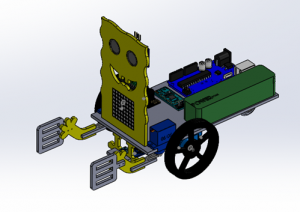
For this project, I used the design of DYOR robot base and I redesigned in solidworks robot hands and face. After, I assembled a 3D model as shown below.
Components
For making this robot I used the next electronic components:
- Arduino UNI + I/O Exension Shield Arduino UNO
- Powerbank 3600mAh
- Ultrasoundsensor HC-SR04
- Buzzer KY-006
- 2 x Servos SG90 (for arms)
- 2 x Servos FS90R (for wheels)
- 2 x Wheels for FS90R servos
- Bluetooth SPP-C
- Line Tracker module TCRT5000
- LED Matrix Display 8×8
- Caster Wheel
- Dupont cables
Functionalities
Sponge Rob is able to do the next tasks:
- Remote control movement
- Line tracker
- Obstacle avoidance
Implementation
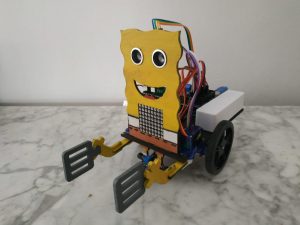
The first step was to assemble the robot. Once I had the robot as it is shown in the picture below, I started to program it.
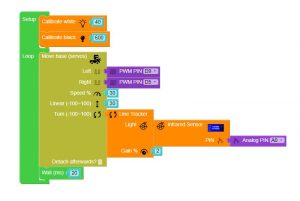
For the line tracking mode, the robot uses a proportional controller so that depending on the level of light that the sensor detects and an intermediate reference of light (a value between the calibration values of black and white), the weel’s rotation will be changed. Facilino’s code is shown below.
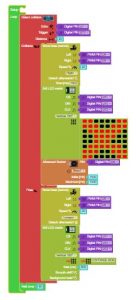
For the obstacle avoidance, the robot moves forward until detects an obstacle, then it turns right until it does not detect an obstacle and after afther that, it moves forward again. While the robot does not detect an obstacle, Sponge Rob statement is written in the LED matrix display, and when an obstacle is detected, a sound alarm is activated and the LED matrix shows a cross (X). Facilino’s code is shown below.
To finish, for remote control two things were needed: a mobile app and a robot program.
The mobile app, that was created with app inventor2, let us control the robot movement with our mobile phone. The orders that the robot can do are:
- Move forward/backward
- Turn left/right
- Close gripper
- Stopping the movement
- Play Sponge Bob song
The app interface is show below.
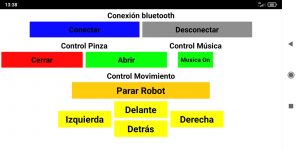
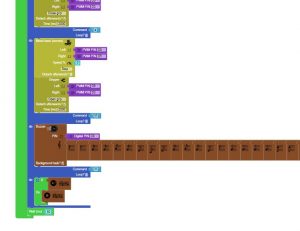
With the buttons of the app, the mobile sends a leter thorugh bluetooth to the robot and the robot, depending on the letter received, does one of the tasks listed before. As I said, one task is playing the Sponge Bob song. For this, I intoduced the musical notes in arduino with facilino. The part of Facilino’s code where the song is introduced is shown below.
Programs
Author
Andrés Fortaleza Lobillo
Universitat Politècnica de València